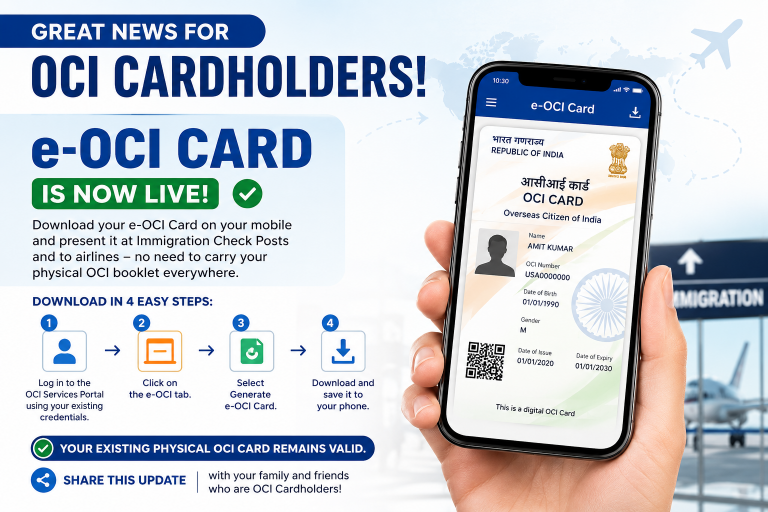

The Government of India has introduced the e-OCI (Electronic Overseas Citizen of India) Card, making travel easier and more convenient for OCI cardholders worldwide.
The digital version allows eligible OCI holders to keep their OCI card on their smartphone and present it when required at immigration checkpoints and airline counters.
Most importantly, your existing physical OCI booklet remains valid. The e-OCI Card is an additional digital facility designed for convenience.
What is an e-OCI Card?
The e-OCI Card is the digital version of your existing OCI Card. Instead of carrying your OCI booklet everywhere, you can securely download the electronic version and keep it on your mobile device.
It offers easier access while travelling internationally and helps reduce the need to carry physical documents at all times.
Benefits of the e-OCI Card
- Carry your OCI Card digitally on your smartphone.
- Quick access during international travel.
- Useful at immigration checkpoints.
- Can be presented to airlines when required.
- Easy to download and store.
- No additional application fee for downloading.
- Your physical OCI Card continues to remain valid.
Who Can Download the e-OCI Card?
The e-OCI Card is available for existing OCI Cardholders who have an active OCI registration and valid login credentials for the OCI Services Portal.
Documents Required
- Existing OCI Card
- Passport details
- OCI Services Portal login credentials
- Mobile phone or computer with internet connection
How to Download the e-OCI Card
Step 1
Visit the OCI Services Portal and log in using your existing credentials.
Step 2
Open the e-OCI section from your dashboard.
Step 3
Select Generate e-OCI Card.
Step 4
Wait for the system to generate your digital card.
Step 5
Download the e-OCI Card and save it securely on your smartphone.
Can You Still Use Your Physical OCI Card?
Yes.
The Government has clarified that the existing physical OCI Card remains fully valid. The electronic version simply provides additional convenience and does not replace the physical card.
Tips After Downloading
- Save a copy on your phone.
- Keep a backup in cloud storage.
- Ensure your passport details are up to date.
- Continue carrying your passport during international travel.
- Keep your OCI information secure.
Frequently Asked Questions (FAQs)
Is the physical OCI Card still valid?
Yes. The physical OCI Card remains valid.
Is the e-OCI Card free?
Eligible existing OCI cardholders can generate and download the digital version through the OCI Services Portal.
Can airlines accept the e-OCI Card?
The e-OCI Card is intended to be presented to airlines and immigration authorities where accepted, along with your valid passport.
Can I use only the e-OCI Card?
You should always travel with your valid passport. Keeping your physical OCI Card as a backup is also advisable.
Can I download it on multiple devices?
You may store your downloaded e-OCI Card securely on your personal devices.
Important Points
- The e-OCI Card is a digital convenience.
- Your physical OCI Card is still valid.
- Download only from the official OCI Services Portal.
- Keep your login credentials secure.
- Always travel with a valid passport.
Conclusion
The launch of the e-OCI Card is an important digital improvement for millions of OCI cardholders around the world. It allows travellers to securely carry their OCI Card on their mobile phones while continuing to use their existing physical card.
If you already have an OCI Card, downloading the electronic version is a simple process that takes only a few minutes and makes future travel more convenient.
e-OCI Card, Electronic OCI Card, OCI Card Download, OCI Card Guide, OCI Services Portal, OCI Card 2026, Overseas Citizen of India, Digital OCI Card